The article compares three secure setups: LMS quizzes, dedicated assessment platforms and practical assignments in a controlled workspace. The right choice depends on the type of assessment you want to run.
AI has made cheating easier than ever before, while making it more difficult to prevent in both digital exams and take-home assessments.
During digital exams without the right security, students can use easily accessible browser extensions, AI-powered browsers, and other cheating methods to access unauthorized help. Take-home assessments are still widely used, but their credibility is under pressure: institutions simply can no longer be certain that students are completing the work themselves.
That is why educational institutions increasingly use secure student assessment software to assess both knowledge and competencies in a controlled environment. Quizzes, essays, coding assignments - all with only the approved tools and resources available and no way to use AI or other cheating methods.
What does a secure student assessment software setup look like?
A secure student assessment setup helps institutions assess students in a controlled environment by restricting access to unauthorized AI, websites, files, and applications.
A secure assessment setup generally combines two functions:
- The assessment layer: An LMS or dedicated assessment platform determines how educators create, deliver, grade, and manage the assessment.
- The security layer: Assessment security software determines what students can access on their device while completing it.
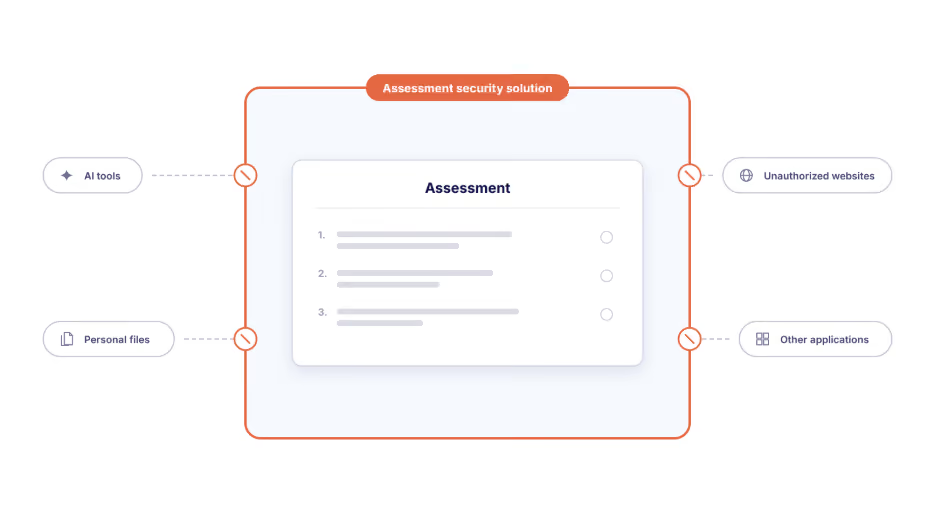
In this article, we compare three common setups for delivering secure digital assessments: an LMS with added security, a dedicated assessment platform with added security, or a standalone controlled assessment environment.
1. LMS-based assessments
A learning management system (LMS) is an online environment for teaching and learning. Institutions use it to organize courses, publish learning materials, communicate with students, collect assignments, deliver quizzes, and manage grades. Popular examples of LMSs widely used by institutions are Canvas, Moodle, Blackboard, and D2L Brightspace.
For a straightforward quiz, the LMS already contains everything an institution needs. Educators can create multiple-choice questions, written questions, timed quizzes, and assignments without introducing another assessment platform.
However, an LMS manages the assessment, not the wider student device. It can't prevent students from opening AI tools, personal files, other websites, or unauthorized applications.
2. Dedicated assessment platforms
Dedicated assessment platforms provide more specialized assessment workflows than a general LMS, including deeper question authoring, central item banks, scheduling, marking, moderation, feedback, and analytics. Some, such as Cadmus, also provide a purpose-built environment for written assignments, where students work with templates, instructions, and resources while educators can review signals such as time on task, editing history, and overall progress.
These platforms do not necessarily replace the LMS. Students may still access their assessment through Canvas, Moodle, Blackboard, or Brightspace before completing the work in a separate environment, with enrollments and grades synchronized between the systems. Examples of assessment platforms include Cadmus, WISEflow, and Cirrus Assessment.
Like an LMS, a dedicated assessment platform does not automatically control the wider student device. Some offer locked exam modes, but the use of external applications and files still require an additional security layer.
How to secure assessments within LMSs and assessment platforms
Secure browser-based assessments (quizzes)
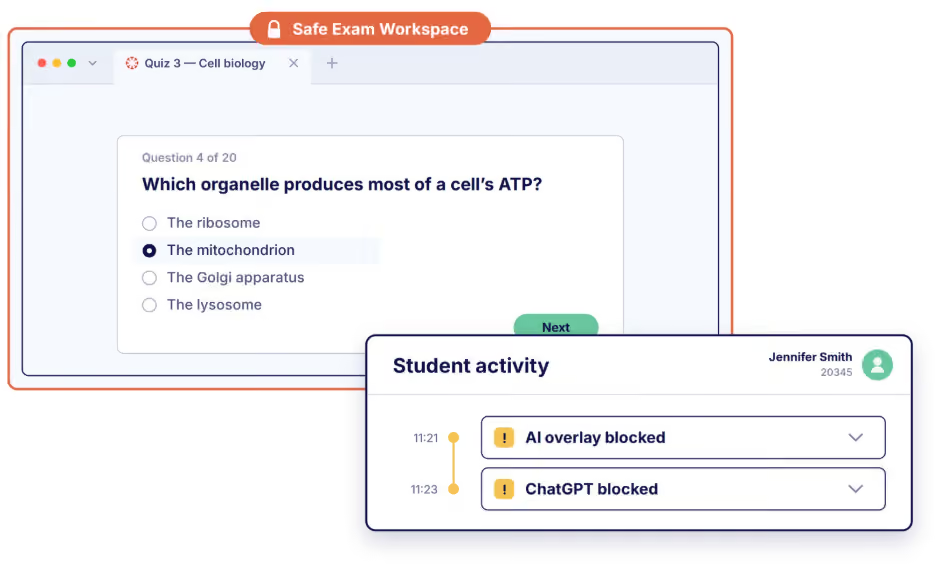
For quizzes, written exams, and other browser-based assessments, a security solution like Schoolyear opens the LMS or assessment platform inside a controlled workspace. Students can access the assessment and any websites approved by the educator. Other websites, browser extensions, personal files, and unauthorized applications remain unavailable on the secured device.
Secure digital assignments with desktop applications and files
Practical assignments require students to produce work in a full desktop application rather than a browser-based answer field. With a solution like Schoolyear, educators can provide an approved application such as Word, Excel, RStudio, SPSS, or Visual Studio Code while isolating it from personal files, cloud storage, unauthorized AI features, and other unapproved resources.
The LMS or assessment platform continues to deliver the instructions and manage the assessment. Students receive the task and supporting files, complete their work in the approved application, and submit the output through the configured submission route.
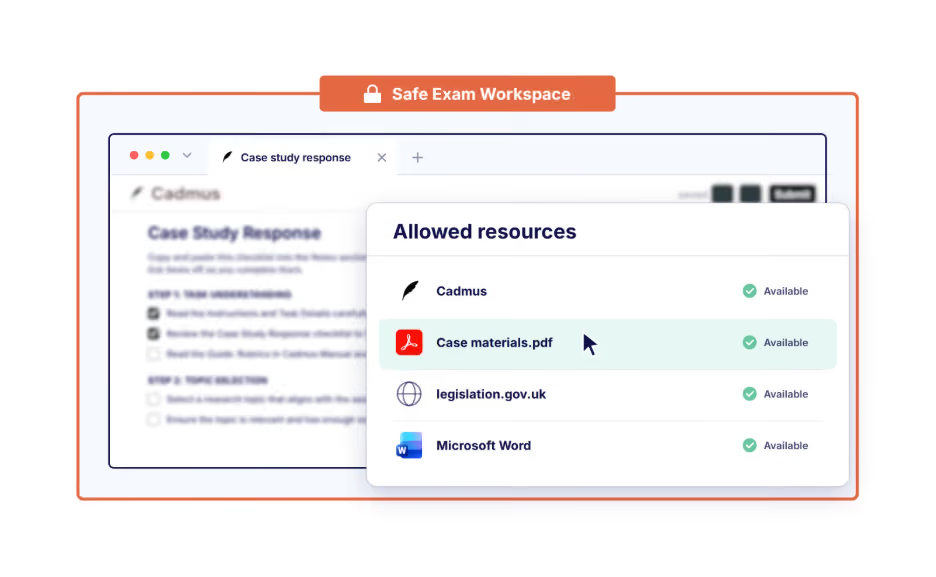
Schoolyear does not replace the authoring, marking, or administrative workflows of the LMS or assessment platform. It provides the controlled digital environment in which students complete the assessment.
3. A standalone controlled assessment workspace
Not every digital assessment has to be built in an LMS quiz engine or dedicated assessment platform. For digital practical assignments, the task can be delivered through an assignment brief, a set of files, and the applications students need to produce their work.
A controlled assessment workspace makes it possible to deliver this type of assessment securely. Instead of limiting students to a browser-based answer field, it creates a complete working environment in which every available tool and resource is chosen by the educator.
Schoolyear as a standalone assessment environment
Schoolyear’s Safe Exam Workspace is a solution that institutions can use in combination with or independently of an LMS or assessment platform. It transforms any device into a controlled environment for both traditional exams and practical assessments.
An educator can build a standalone assessment by:
- Adding the assignment instructions as a PDF.
- Providing the desktop applications students need.
- Adding supporting files such as datasets, source files, templates, or reference documents.
- Allowing specific websites or online resources.
- Optionally allowing a selected AI tool when its use is part of the assessment design.
- Blocking all other applications, files, websites, AI tools, and communication routes.
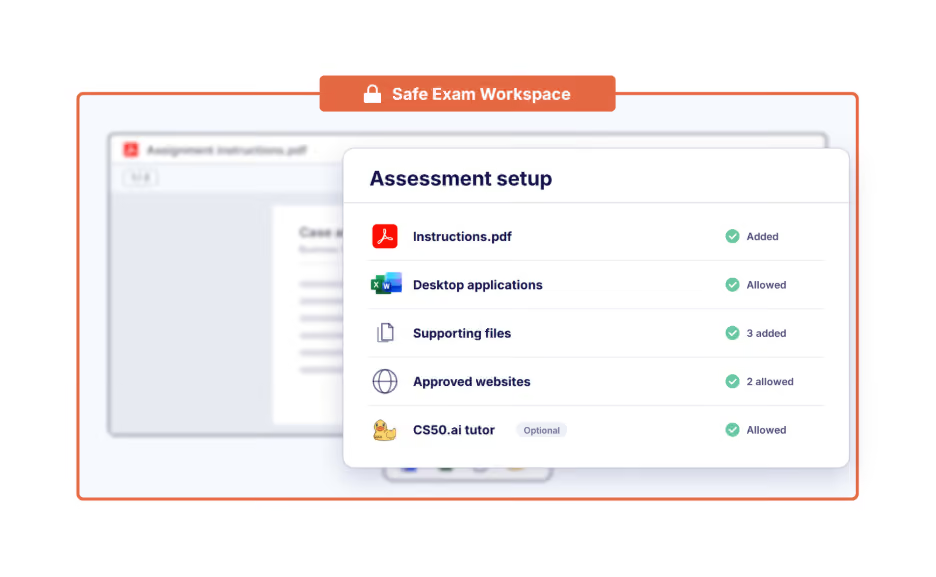
Students complete the task using the same types of applications they would use in practice, but without access to unauthorized help.
Practical example: moving take-home assessment into a controlled environment
What does it look like when a university moves part of its practical assessment from a take-home setting into a controlled environment? Eindhoven University of Technology provides a clear example.
Their goal was simple: assessing the competencies of their students without help from AI.
In their current setup, Ans remains the assessment platform and Schoolyear provides the controlled environment. Students receive a practical assignment in Ans, then solve a programming problem using Python and Visual Studio Code or analyze a supplied dataset in RStudio. Only approved applications and resources are available; AI tools, personal files, and unauthorized websites remain blocked.
The assignment therefore remains practical, but the conditions change from unrestricted take-home work to supervised, independent assessment. TU Eindhoven primarily uses this approach for final exams and is now also testing it in three midterms within one course.
→ Read the full story of Eindhoven University of Technology
Conclusion
A secure student assessment setup involves two separate decisions: where the assessment is created and managed, and how the student’s working environment is controlled.
Schoolyear can secure assessments in your existing LMS or assessment platform, or provide a standalone environment for essays, coding, data analysis, and open-book assessments. Book a demo to see how your institution can assess what students know and can do without unauthorized assistance.
Share this



.avif)