.avif)


Cheating has become a multi-million-dollar industry. Cluely, a tool its own founders describe as built to "cheat on everything", has raised over $20 million in venture funding. It works in job interviews, on sales calls, and even during proctored digital exams. This article explains exactly how it works, why it's so hard to detect, and what educational institutions can do to block it.
A student sits down for a digital exam. There is no phone on their desk and there are no notes in sight. The supervisor scans the room and everything looks fine.
The student finishes in the top percentile.
Later, the teacher reviews the results. Something feels off, the answers are too... perfect. But there's no evidence. No flagged tab switch or a recording of a suspicious eye movement. No technical trail at all.
What the supervisor couldn't see was a thin, transparent layer on top of the student's screen. It’s invisible to screen-sharing tools, invisible to proctoring software, and very hard to spot by the naked eye of a supervisor. It was reading the exam questions in real time and generating answers.
That's Cluely.
What is Cluely?
Cluely is a desktop application that places a transparent AI overlay on a user's screen. It reads what's on the screen, listens through the microphone, and generates real-time answers. All while staying hidden from standard monitoring tools.
The product was built by Chungin "Roy" Lee and Neel Shanmugam, two former Columbia University students who were suspended in early 2025 after creating an earlier tool called Interview Coder. That tool helped candidates cheat on technical job interviews by providing AI-generated answers to coding challenges, hidden from interviewers.
After their suspension, Lee posted Columbia's disciplinary letter publicly on X. It went viral. Within weeks, the two had dropped out, rebranded the tool as Cluely, and raised $5.3 million in seed funding. Later, they raised $15 million in Series A funding from A16z. This means that cheating is now a multi-million-dollar industry, backed by one of the most influential venture capital firms in Silicon Valley.
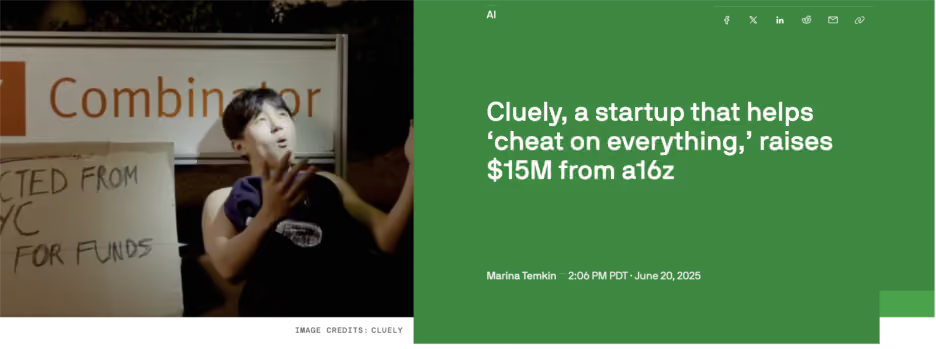
Cluely describes itself as a tool "built to cheat on everything." Their founding manifesto argues that if cheating becomes universal, it stops being cheating. That AI assistance is simply the new normal, and resisting it is futile.
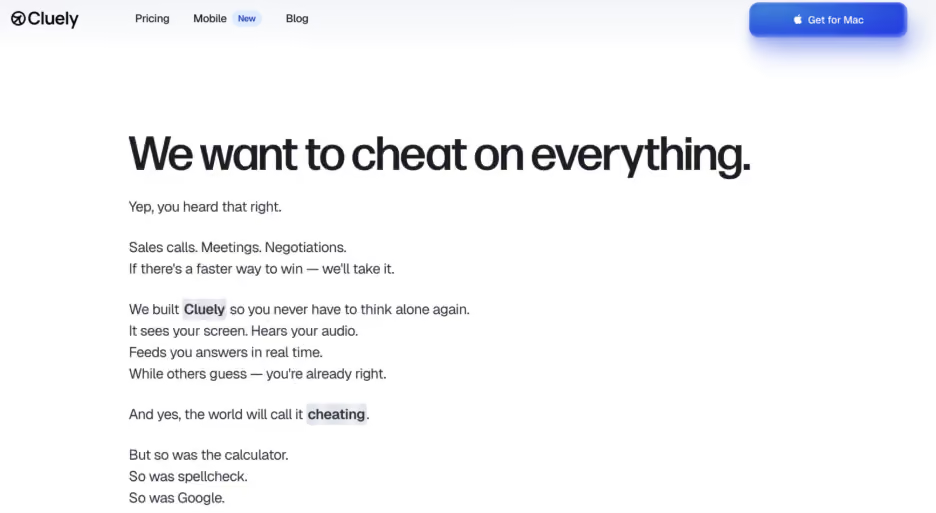
Cluely’s manifesto originally included ‘cheating on exams and job interviews’, which they have cleaned up. The tool is currently marketed as a tool to ‘cheat’ sales calls, client negotiations, and meetings. But students are smart enough to understand that the capabilities that help in business settings can just as well work during a digital exam.
How Cluely enables cheating during exams
The student installs the application on their laptop before the exam. When the exam begins, they activate Cluely using a hidden keyboard shortcut. A transparent overlay appears on screen that sits above all other windows, including the exam interface.
Cluely reads the content on screen (the exam questions, the text, the context) and within seconds generates answers that appear in a small floating bar sitting over the student's screen. Only the student can see it. They read the answer, type it in, and move on.
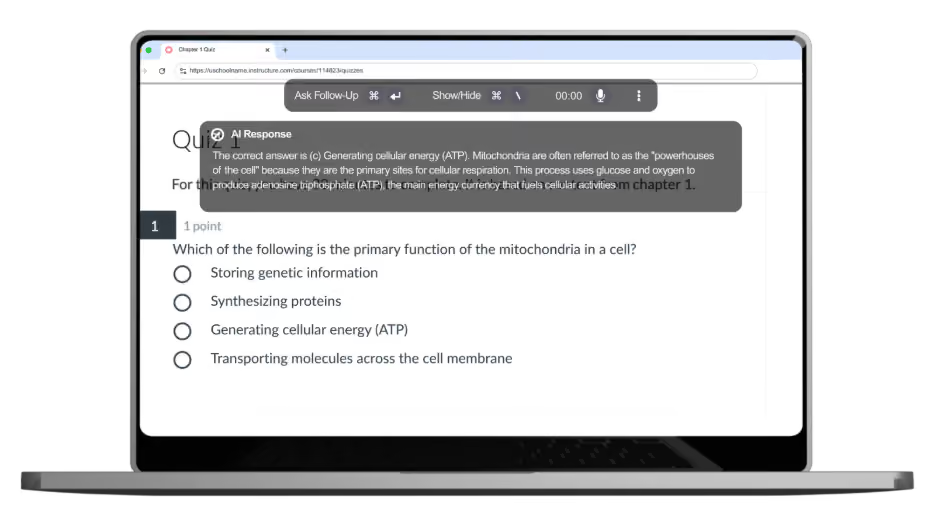
Cluely's real trick isn't that it looks invisible on screen. A supervisor standing close enough might spot the floating bar. The trick is that it doesn't show up where monitoring tools are looking. A screen recording browser extension can't capture it.
Why Cluely is different from opening ChatGPT
Most institutions have started addressing AI cheating by using in-browser blocking mechanisms. The idea is that if a student can't open ChatGPT or Claude in another tab, they don't have access to AI at all. And that logic is sound for tools that require a browser.
But Cluely was specifically built to make that logic irrelevant.
Opening ChatGPT during an exam requires leaving the exam environment. It means switching tabs or windows, which can be logged by basic lockdown and proctoring tools. It creates a visible behavior in the browser, a moment where the exam interface is not in focus.
Cluely does none of that. It operates as a separate desktop application, entirely outside the browser. It never asks the student to switch tabs, open a new window, or navigate away from the exam. The AI assistance arrives inside the same visual space as the exam itself.
Why Cluely is so hard to detect by traditional lockdown and proctoring tools
Cluely's evasion capabilities are hard to detect, even during a proctored exam. Here’s why.
Hidden global shortcuts. Cluely is activated and controlled through keyboard shortcuts that bypass standard keystroke logging. Most proctoring tools that monitor keyboard activity are looking for specific inputs, such as certain key combinations, typing patterns, and clipboard activity. Cluely's shortcuts are designed to fall outside what these tools look for.
The transparent overlay. Standard tab-switch detection monitors when the active application window changes. If a student switches from the exam tab to ChatGPT, the system registers a focus change. But Cluely's overlay sits on top of the exam interface without replacing it. The exam window never loses focus. As far as the monitoring system is concerned, the student has been looking at the exam the whole time.
Invisible during screen sharing. This is particularly significant for remote and online exams. When screen recording is active, as it would be during a remote proctored session, Cluely's overlay does not appear in the shared view. The proctor watching the student's screen sees the exam interface. Only the student sees the overlay.
Not detectable via browser extensions. Many institutions use software that blocks cheating inside of the browser. But Cluely operates outside of the browser as a standard desktop application. There is nothing in the browser's extension list to flag.
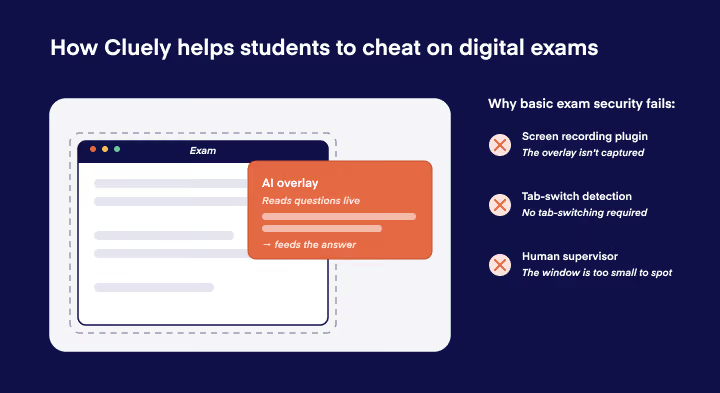
The combined effect of these features is that by the time most traditional exam security software flags anything ‘suspicious’, there is no recoverable technical evidence. Just a student who scored surprisingly well.
This is not a criticism of any specific proctoring or lockdown product. It reflects a structural limitation: a tool confined to the browser cannot see what is happening on the rest of the device. To block Cluely, the security layer needs to operate at the same level where Cluely runs: the operating system.
More methods that don’t work against Cluely
It's worth being direct about this, because several commonly used measures give a false sense of security.
We’ve already established that traditional lockdown and proctoring tools don’t work against Cluely. Here are more often tried methods that don’t stand a chance:
Human supervisors. A supervisor walking the room can’t easily see Cluely. Especially in large exams rooms, the small Cluely pop-ups are simply not easy to spot.
AI-detection tools on submitted work. Tools that scan submitted answers for AI-generated content might, in theory, flag output that reads like AI wrote it. But this proves nothing useful. It can't identify how the answer was generated, it can't prove Cluely was used, and it opens institutions up to false accusations against students who simply write clearly. It is also easily gamed by making minor edits to AI-generated output.
Honor codes. A student willing to install a purpose-built cheating application is not deterred by a policy document.
None of these are worthless in general, they address other threats. But against Cluely specifically, they offer no meaningful protection.
What actually works: blocking Cluely at the system level
Cluely runs at the operating system level. So the security to block Cluely needs to run there too.
That's really the whole answer. If your exam security lives inside a browser, it operates in a sandbox that can’t see what's happening on the rest of the device. Cluely sits outside that sandbox. The two never meet.
What you need instead is an exam security solution that operates below the browser, at the OS level. When the exam begins, the student's device enters a controlled state managed by a system-level process. In that state, unauthorized applications simply can't launch. If a student has Cluely installed, it won't work.
That's prevention rather than detection. And against a tool like Cluely, prevention is the only approach that works reliably.
How Schoolyear blocks Cluely during exams
Schoolyear's Safe Exam Workspace is built to block cheating tools like Cluely at system level.
When an exam starts, the student's device enters a secure exam mode enforced at the operating system level. Unauthorized applications, including Cluely, cannot launch. Screen-sharing tools and remote desktop applications are blocked. Risky system shortcuts are disabled. The secure state is maintained by a system-level process that students cannot disable or work around.
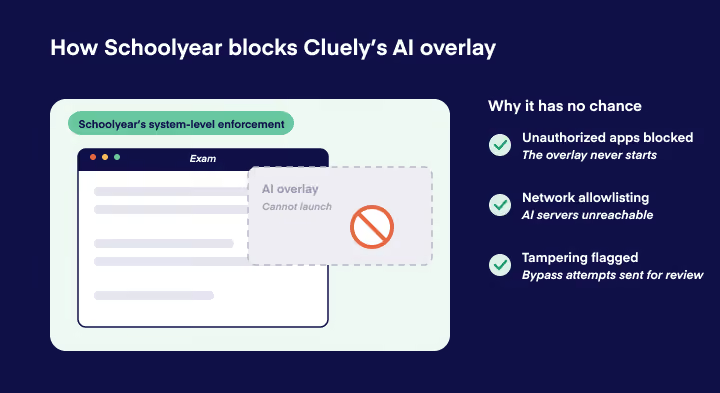
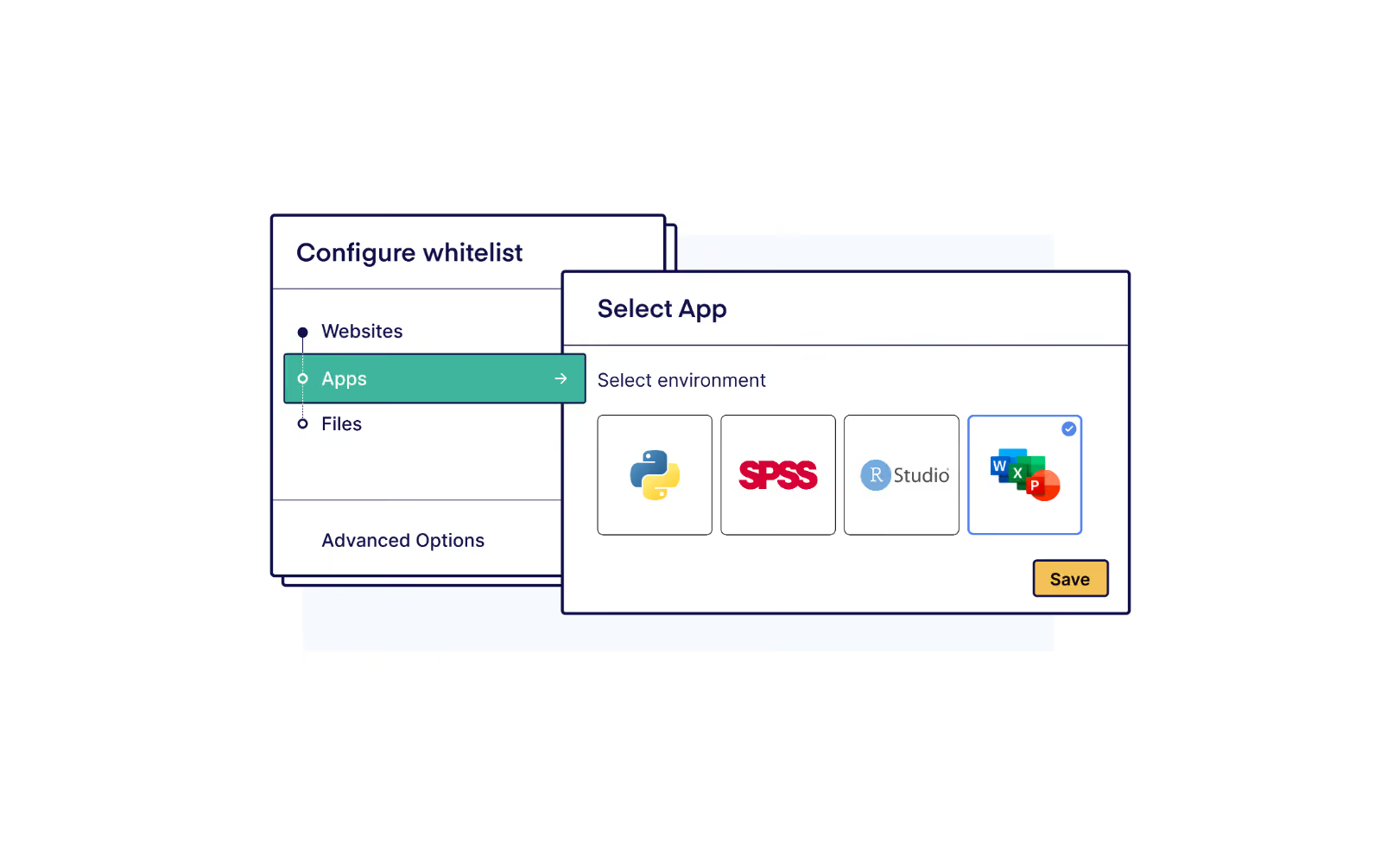
Internet access is controlled through allowlisting. Educators specify exactly which websites students may visit during the exam. Everything else, including the external servers that Cluely depends on, is blocked by default, at the network level of the device, not just in the browser.
If the secure environment is tampered with (e.g. if someone attempts to run the exam inside a virtual machine) the system flags the device. It marks the session as requiring review, giving administrators information without automating a verdict.
Honest students experience a normal exam. The constraints are invisible until someone tries to cross them.
The choice institutions face
Cluely is not going away. There will be more tools like it, better at hiding, harder to detect with any monitoring-based approach. Especially now that tools like these are backed by venture capital.
Institutions face a real choice here, and it is not "trust students" versus "surveil students." That framing misses the point. The real question is whether your exam infrastructure is built to prevent misuse or merely to discourage it.
Discouragement works on most students most of the time. But it has never been a complete answer to academic integrity, and it is less of an answer every year as the tools for cheating become more capable and more accessible.
Building exam environments where AI misuse is technically impossible is the direction this needs to go. The technology to do that exists today.