.avif)


Coding is one of the assessment areas AI has hit hardest. A student can have a complete, working application generated for them, submit it as their own and score well, without writing or even understanding any of the code. That makes take-home coding assignments increasingly hard to trust as a measure of skill.
Many educational institutions are struggling with how to solve this. Some of them opt for theory-based, in-person exams. But a written, theoretical exam about code only captures whether a student can read and reason about code, not whether they can write and debug it under real conditions.
So how do you assess genuine coding skill in a setting you control, such as an in-person exam? And what if you want to go a step further and let students use AI during an assessment, because working with AI is part of the future you're preparing students for, while still being sure the work is their own?
This article covers:
- What AI has done to the reliability of coding assessments
- How coding assessments are taken today
- How students can cheat inside an unsecured IDE
- Why whitelisting an IDE is risky
- What a secure coding assessment setup looks like
AI has broken the trust in take-home coding assessments
AI tools can now produce a complete, working application from a prompt. A student can hand in polished, functional code that looks like strong work and reveals little about their own ability.
A 2026 study by UC Berkeley researcher Igor Chirikov offers one indication of how strongly AI may be affecting assessment results. After analyzing more than 500,000 grades at a public research university in Texas, he found that the share of A grades climbed much faster in courses with substantial writing and coding work than in less AI-exposed courses, with the effect concentrated where homework carried the most weight.
Institutions are noticing the same thing in practice. At UC Berkeley, failing rates in several computer science courses rose sharply in spring 2026, which professors attributed in part to a rise in AI-driven academic dishonesty. In one introductory course, nearly 30 students were caught cheating on take-home exams, and a professor described students who had leaned on AI throughout the term and were not ready when it counted.
How coding assessments at educational institutions are taken today
Across programming courses, assessment usually takes one of three forms. Each trades off authenticity against security.
Take-home assignments and projects. The most authentic format. Students plan, build, iterate, and debug with real tools, close to how they would work in practice. It is also the format AI has compromised most, which is why institutions are moving away from it for grades that count.
In-class theory exams. Putting the exam in a room, on paper or in a digital quiz with a traditional lockdown browser, greatly reduces access to unauthorized AI tools. But it changes what you measure. Reading code, tracing it, and explaining an algorithm capture real parts of programming competence, and they line up with the ability to write code. What they do not capture is whether a student can sit down and produce and debug a working program.
Some institutions take this furthest by having students write functions out by hand, on paper. There is no autocomplete and no compiler to catch a mistake, so a single missing bracket costs points, and questions often get simplified just so students can finish writing them out in time.
In-class practical assessments. Students write real code in a real IDE, or integrated development environment, the software developers use to write, run and debug code, such as VS Code or IntelliJ, supervised. This is the most direct way to test whether students can produce and debug working code.
In many cases, the security around these assessments is little more than an instruction to disconnect from Wi-Fi. Because that restriction is not technically enforced, students can reconnect temporarily or use another available network connection without the exam setup necessarily detecting it.
The moment you hand a student a real IDE, you are handing them software built to reach the outside world. It is worth looking at exactly what a student can do from inside one.
How students cheat inside an IDE like VS Code
Suppose you give students access to a real IDE such as Visual Studio Code during an assessment. A modern IDE is built for connectivity and extensibility. That's what makes it difficult to secure in an assessment. Without the right controls, it ships with a long list of features that enable cheating.
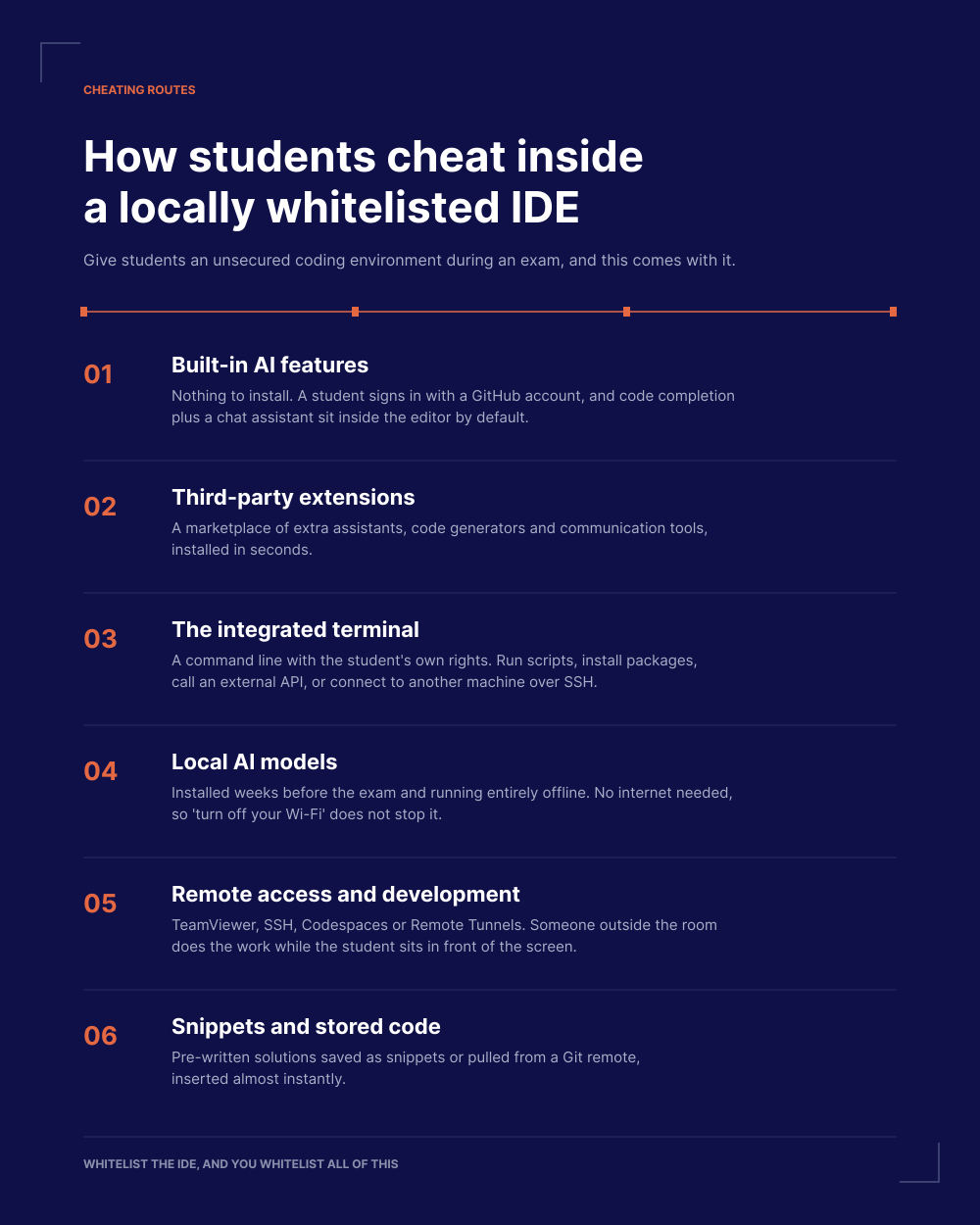
Built-in AI features. You no longer need to install anything to get AI in VS Code. Current versions include built-in AI features. A student activates them by signing in with a GitHub account, after which users without a paid subscription can be enrolled in Copilot Free. Code completion and a chat assistant then sit inside the assessment environment by default.
Third-party extensions. On top of the built-in features, VS Code has a marketplace where students can install additional assistants, code generators, communication tools and other functionality in seconds.
The integrated terminal. VS Code comes with a terminal: a command line built into the editor. It is not limited to the assessment project. It works like the command line on the student's own laptop, with the same rights the student has there. Depending on their permissions, installed software and network access, students can use it to run scripts, install packages, call an external API, connect to a remote machine over SSH, or pull in prepared solutions.
Even a strictly enforced no-internet rule does not close the AI route here. A student can install a local AI model such as Ollama in advance and run it entirely offline, directly on the laptop. No API call, no download during the assessment: the terminal only has to launch a program that is already sitting on the disk.
Remote access and remote development. Handing the assessment to someone outside the room is one of the easiest routes there is, and it does not take an IDE feature to do it. A student can install TeamViewer or a similar remote desktop tool beforehand and let someone at home take over the laptop entirely: a friend, a graduate, or a paid contract cheater who types the answers while the student sits in front of the screen. The IDE offers its own versions of the same idea. VS Code can connect to another computer through SSH, Codespaces or Remote Tunnels.
Snippets and stored code. Students can save reusable code as snippets, each triggered by a short prefix, which allows large blocks of pre-written code to be inserted almost instantly. With network access and a Git remote, prepared solutions can also be pulled in during the assessment.
None of this requires technical sophistication. Most of it is documented functionality that ships with the editor, and the rest is free software any student can install beforehand.
Why whitelisting an IDE opens the door to cheating
Traditional lockdown tools don't offer a secure way to conduct coding assessments with IDEs.
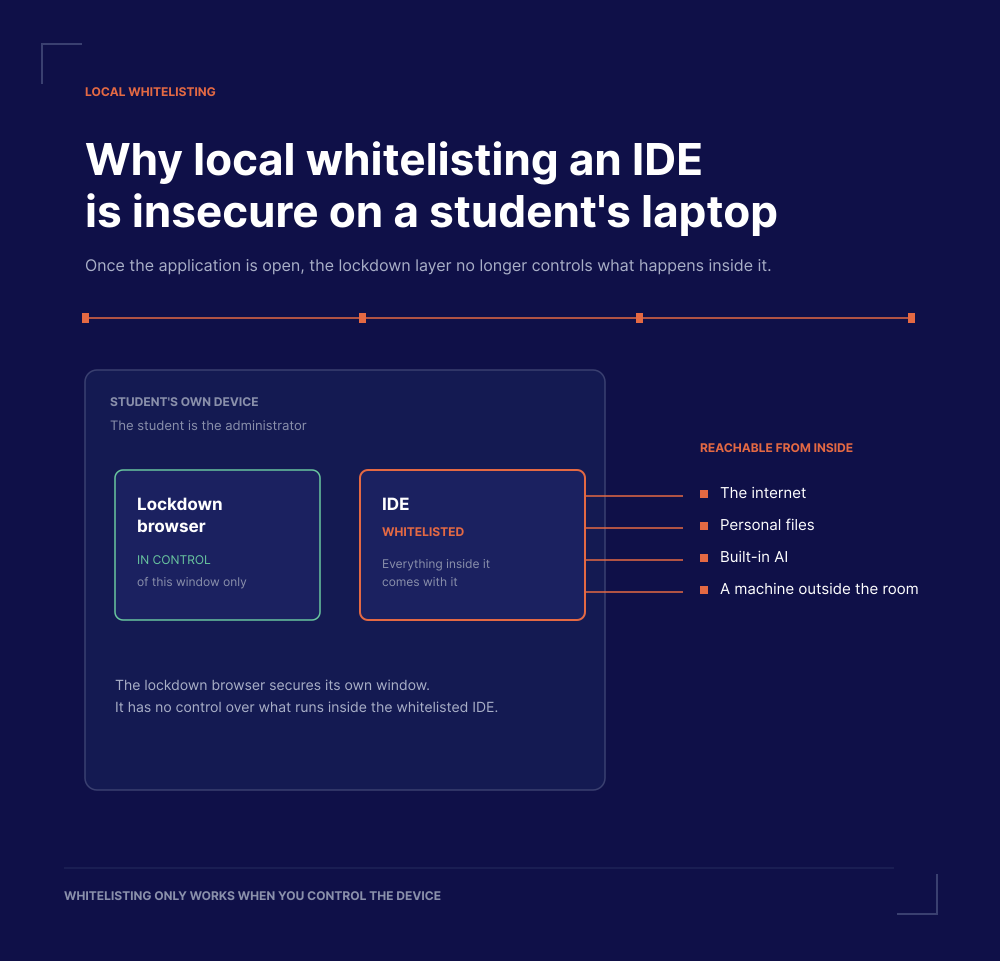
Instead, they can either lock the device down and only allow access to specific websites, which leaves no room for a real IDE. Or they can whitelist the application, which means launching an IDE like VS Code and letting the student use all of it, including the routes described above.
There is also the assessment content itself to consider. Writing a good coding assessment, with real test cases and questions that cannot simply be looked up, takes institutions significant time and effort. When that content sits locally on a student's device, as the assignment file, sample data, or test cases, keeping it contained depends on the student deleting it afterward. If it leaks, a later cohort or a resit group can end up with the exact same questions in advance, and the exam is compromised. Institutions then have to write a new one from scratch.
On managed computers in a physical lab, an IT department can compensate. It controls the hardware, strips admin rights, and enforces system-level policies: restricting the network, blocking the extension marketplace, disabling shared drives, removing personal accounts. The student cannot undo any of it because the student is not the administrator.
On student-owned devices, that control looks very different. This matters as institutions move to BYOD (Bring Your Own Device), where students sit exams on their own laptops. The student is the administrator of their own machine, so the institution does not retain durable control over the full device. Whitelisting an IDE on BYOD hands the student a tool the institution cannot lock down from the inside.
How Schoolyear prevents cheating during coding assessments with IDEs
Schoolyear's Safe Exam Workspace was built for authentic assessments on student-owned devices. Instead of whitelisting an application that then runs on the student's laptop, it runs the IDE in an isolated environment that the institution controls. The controlled environment can provide access to a web-based coding platform or deliver a full desktop IDE such as VS Code or IntelliJ. In both cases, the institution controls the environment in which the code, files and development tools are available.
That works in two layers.
On the physical laptop. When the assessment starts, Schoolyear turns the student's device into a controlled assessment workspace at system level. It prevents the student from switching to local applications, personal files, communication channels or remote access software. The laptop becomes a display, and the actual work happens in an environment the student cannot reach into from the outside.
Inside the IDE environment. The institution defines what the IDE can do: which extensions, packages, files, tools and network destinations are available. It can come pre-configured with the package managers and toolchains the assessment requires, while everything else is stripped out. For VS Code, that means a standardized build with:
- No extension marketplace, and built-in AI features disabled
- Controlled network access, limited to the package sources, APIs or documentation the assessment requires
- No remote development, remote access or settings sync
- No personal files, cloud drives or saved snippets
This also addresses what is already on the device. A student's laptop might have a local AI model installed weeks before the assessment, something no network restriction can detect from the outside. Because the IDE runs in a separate, isolated environment, whatever exists on the physical device, installed in advance or not, is not reachable from inside the workspace.
That control is also what lets you decide the assessment design yourself. If you want to see unaided ability, you close every route to AI, including the features built into the IDE. If you believe working with AI is a skill worth assessing, you allow exactly the tool you want, such as Claude, and judge how students use it. Either way, communication and remote access stay closed, so nobody outside the room can do the work for them.
Conclusion
AI has made take-home coding work harder to trust, and theory exams measure something narrower than what you want to see. One of the strongest ways to assess applied coding skill is to have students write real code in a setting you control. But an IDE is full of routes to the outside world, and whitelisting one on a student's own laptop opens all of them. For BYOD exams that require a full IDE, running that IDE in a controlled isolated environment is a more robust approach than locking everything down or trusting an open application.
→ Want to see how a secure coding assessment works on student-owned devices? Book a demo.