
Utrecht University runs nearly all of its digital assessments on 2,900 university-managed Chromebooks, across three locations. When the kiosk app that secured those Chromebooks reached end of life, Utrecht University found almost no assessment security solution that worked on managed Chromebooks at that scale. Schoolyear does. Amber van Geerestein, Project Manager at the Centre for Academic Teaching and Learning, and Elske de Vries, Product Owner Digital Assessment, explain how Utrecht University made the switch and how it opened the door to secure assessments with applications like JASP and RStudio.
The challenge: replacing a kiosk app on 2,900 managed Chromebooks
High-scale assessments on managed Chromebooks
For years, Utrecht University secured its digital exams with a kiosk app built by one of its own lecturers. It did its job well, but it was also rigid. "It wasn't very flexible when it came to whitelisting resources or handling new requests from educators," Amber says. Then an announcement from Google meant the app, as it was built, would no longer be supported, and Utrecht University had to find a new way to secure its digital assessments.
Utrecht University set four requirements for the replacement:
- Reliability: stable exams with strong fraud prevention.
- Scalability: large numbers of students starting at once, across multiple locations.
- Managed Chromebooks: it had to work on the devices Utrecht University already uses for nearly every digital exam.
- Applications: room to assess with software such as JASP and RStudio, with control over in-app features like add-ins and AI assistants.
With around 85% of its assessments conducted digitally, reliability and scale were a top priority. "We facilitate around 240,000 assessments a year for all eight faculties," Amber says. "The central support staff as well as faculty key-users provide support on multiple levels." Nearly all of those assessments run on 2,900 managed Chromebooks.
"We facilitate around 240,000 assessments a year for all eight faculties. The central support staff as well as faculty key-users provide support on multiple levels.”
Amber van Geerestein — Product Manager at the Centre for Academic Teaching and Learning, Utrecht University
Finding a solution that met all four requirements was hard, mainly because most exam security tools Utrecht University looked at were not compatible with managed Chromebooks. An internal team built its own proof of concept that locked the Chromebooks down from the Google Admin Console, but it wasn't user-friendly and didn't scale.
That left Schoolyear: it met the requirements on Chromebooks at Utrecht University's scale, and it could run assessments in applications too. "Schoolyear was really the only larger player on the market offering a complete package," Elske says.
Growing demand to assess skills in desktop applications with control over AI
Losing the kiosk app "also opened doors," Elske says, "because there were lots of requests to use desktop applications during assessments."
Until then, the only option was a separate setup with JASP and SPSS on around 200 Chromebooks. "We couldn't make that setup scale properly," Elske says, "so we held off on those requests for a long time."
Requests to assess students with access to applications have grown sharply in recent years. AI is an important driver behind this: educators want to assess students in desktop applications, but with control over the AI built into those apps. "We see students using AI much more," Amber says. "So, with certain types of work that students used to do at home, we're now asking: can't we do those assessments in a secured environment on the Chromebooks?" We view this as a short-term solution, until the educators at the UU have time to properly reevaluate their assessment methods and goals.
"With certain types of work that students used to do at home, we're now asking: can't we do those assessments in a secured environment on the Chromebooks?"
Amber van Geerestein — Product Manager at the Centre for Academic Teaching and Learning, Utrecht University
These assessments differ from traditional exams in what they measure: the focus shifts from testing knowledge to testing skills. "In an assessment with applications, it's really about students not only having knowledge, but also showing what they can do," Amber says.
The solution: one secure environment for all assessment platforms and desktop applications
A user-friendly environment for any assessment
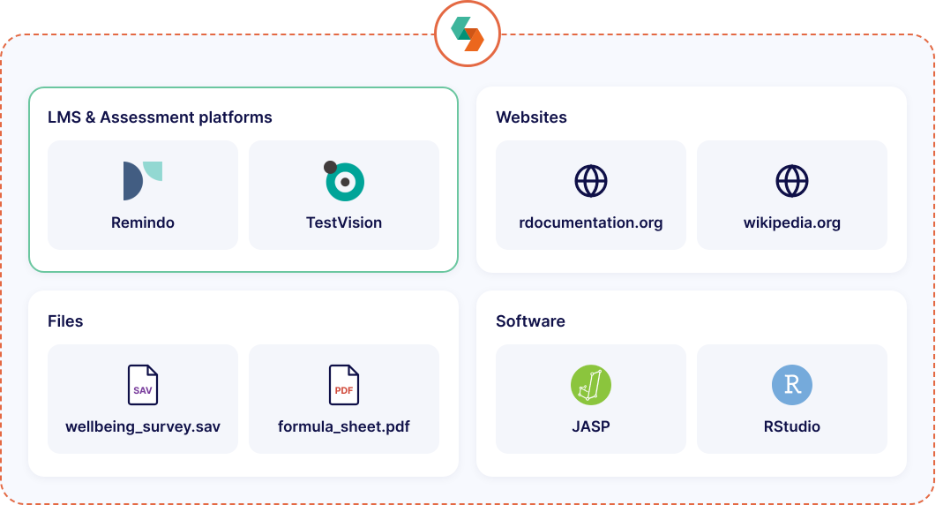
With Schoolyear, the institution's Chromebooks are locked down for the duration of any digital assessment. Utrecht University decides per assessment what students can access: which websites, files, or desktop applications. What changed most for the team is how easy it has become to add assessment platforms and applications to their digital exam environment.
"With Schoolyear, we're more flexible in meeting the specific needs of individual programs and courses. Assessment platforms used by individual faculties can now be allowed into our central landscape much more easily."
Amber van Geerestein — Product Manager at the Centre for Academic Teaching and Learning, Utrecht University
That has broadened what the central service can offer. For years, that was mainly the central exams in the platform Remindo. Today, Utrecht University also offers TestVision for UMC Utrecht, supports several smaller faculty assessment platforms, and runs assessments with applications like JASP and RStudio at scale, with more applications to come. "We're more flexible in meeting the specific needs of individual programs and courses," Amber says. "Assessment platforms used by individual faculties can now be allowed into our central landscape much more easily."
Just as important: Schoolyear holds up at scale. "We were one of the first really large institutions that used Schoolyear, and probably the first to run the Remindo integration with Schoolyear at scale," Elske says. "As an early adopter, you'll always run into a few issues, but those were fixed fairly quickly."
Since then, the setup has been steady. "Schoolyear has been very stable for well over a year and a half now," Elske says. "And we're really happy with that."
"Schoolyear has been very stable for well over a year and a half now, and we're really happy with that."
Elske de Vries — Product Owner Digital Assessment, Utrecht University
A smooth implementation, tested in real exams
Utrecht University took time to bring everyone along in implementing Schoolyear, including key users and colleagues who were wary of the change. Instead of a classic pilot, it started with a few real exams with extra support. The goal was to see what the team would actually run into in the exam hall, how students would react, and whether they would notice a difference at all.
Utrecht University chose not to email all 40,000 students about the switch. For students, the process on exam day would hardly change, so the team informed the people in the room instead: teachers, key users, and e-assistants.
Before the start of the first exams, the team was there to tell students about Schoolyear and afterwards asked them in the hallway whether they had noticed anything. A few had spotted minor differences, but overall, the switch went smoothly for students.
How an assessment with desktop applications like RStudio works at Utrecht University
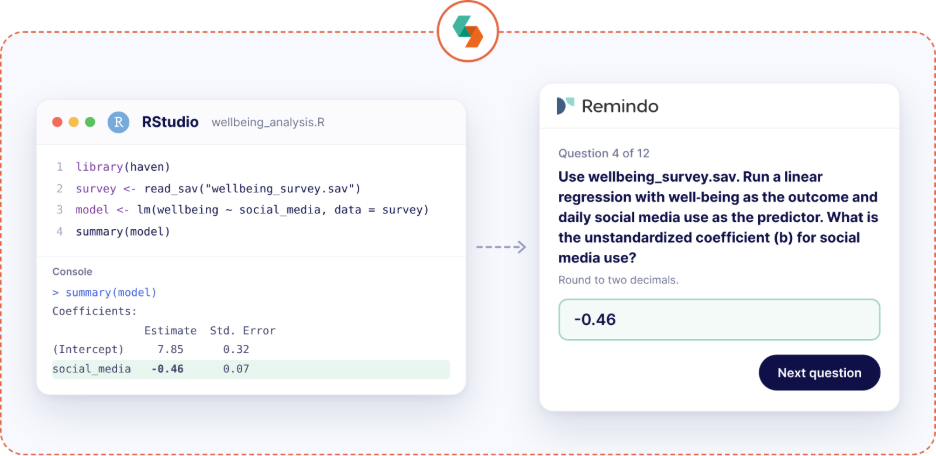
Utrecht University enables educators to conduct assessments with applications such as RStudio. This is how such an assessment works in practice:
- Before the exam: the Chromebooks are set up and opened in the exam hall before students arrive, just as for any other exam.
- Start in Remindo: students start their assessment in Remindo. Schoolyear locks the Chromebook down, and only the resources and tools the assessment allows are within reach. AI tools, other websites, and personal files are not.
- Open RStudio: RStudio doesn't open locally on the Chromebook, but in a virtual environment inside the secured session. AI assistants, personal files, and add-ins are not accessible.
- Do the work: a question in Remindo asks for a calculation or analysis. Students carry it out in RStudio.
- Answer in Remindo: students copy their results into the answer field of the question in Remindo.
- Grading: Remindo grades the answer automatically or splits the grading across graders.
Utrecht University is rolling out new applications slowly, watching how each application performs in the exam hall before adding new ones. Demand is not the limiting factor. "There's a lot of demand for these types of assessments," Elske says. "Ideally, we'd scale it up tomorrow."
The result: secure, flexible, and future-proof assessments
Today, Schoolyear secures around 240,000 assessments a year on Utrecht University's managed Chromebooks, across all eight faculties and three locations. Exams have run stably for well over a year, and for students, the switch went largely unnoticed.
Elske's team also finds Schoolyear easy to work with: they can add a web-based assessment platform or whitelist a website in a few steps, without too much specialized work. That has allowed the central support team to facilitate smaller faculty assessment platforms alongside Remindo and TestVision.
Assessments with desktop applications now run securely too: students analyze data in JASP and code in RStudio inside the secured session, without access to AI assistants or their own files. Office 365 and Visual Studio Code are next. "We have Visual Studio Code on the agenda for Python exams and other programming exams," Elske says.
Utrecht University can now also scale its exams to student-owned devices when needed. Schoolyear already works on students' own laptops; what still holds Utrecht University back for high-stakes exams is the exam halls, with few power outlets and no support setup for student devices yet. For now, students can use their own laptops for formative quizzes in the classroom.
Share this