.avif)


Many institutions run digital exams in computer labs, where all devices are managed by the school’s IT department. The challenge during every exam period is turning those machines into secure exam environments.
Some institutions have ended up solving this with shared exam accounts: stripped-down Windows user accounts with restricted policies that block everything except what the exam requires.
The approach works, up to a point. But IT teams running it deal with security exceptions that conflict with their own compliance policies, weeks-long setup lead times, configurations that break after routine software updates, and hardware fleets that sit idle for most of the year.
This article explains how exam accounts work under the hood, why they create these problems, and what a better approach to securing exams in computer labs looks like.
TL;DR
- Shared exam accounts are a widespread but improvised solution for securing computer lab exams
- They work by applying group policies in Active Directory to restricted user accounts
- The setup is operationally heavy, expensive, and creates security and compliance problems that IT departments quietly work around
- It also can't scale easily: buying and managing dedicated exam hardware is costly, and it isn't applicable for student-owned devices
- There's a better way: secure exams on students' personal accounts with exam security software
How shared exam accounts work
Shared exam accounts emerged as a practical fix when institutions started running serious digital exams. Students use their personal accounts for day-to-day work - accessing files, applications, and the internet. In an exam, none of that should be accessible. So IT created separate, restricted accounts instead. Here's how those accounts actually work.
What is a shared exam account?
A shared exam account is a shared Windows user account created specifically for exam use. It isn't tied to any individual student. Instead, it's a generic identity - exam01, exam02, exam03 - that any student can log into during an exam period, because the account has already been configured with the right restrictions.
The restrictions applied to these accounts typically follow the same pattern. Internet access is blocked or limited to a whitelist of approved domains. USB ports are disabled. Personal drives and cloud storage like OneDrive are hidden. Only a specific set of approved applications can be launched. The student logs into what is essentially a stripped-down Windows environment, purpose-built for that exam and nothing else.
How a shared exam account is configured
Most Windows-based institutions manage their users and devices through Microsoft Active Directory (AD) - essentially a central register of every account and computer on the network. Within AD, accounts are organized into groups called Organizational Units (OUs): folders like "Staff", "Students", or "Exam Accounts". What makes OUs useful for exam purposes is that rules can be applied at the folder level. Any account placed in the Exam Accounts OU automatically inherits those rules.
Those rules are defined in Group Policy Objects (GPOs) - configuration sets that Windows applies the moment an account logs in. A GPO can block internet access, disable USB ports, hide personal drives, prevent applications from launching, and strip down the desktop. When the exam account logs in, the machine locks down. When it logs out, everything returns to normal.
In practice, setting this up means creating a batch of user accounts (exam01, exam02, and so on), putting them in the Exam OU, writing a GPO that defines what is and isn't allowed, and testing the whole thing before the exam period starts. Every institution builds this differently, using the tools and knowledge available to them at the time. The result is always a working setup of some kind - but an improvised one, and no two are quite alike.
Why exam accounts create serious problems
Everyone involved in running this kind of setup knows, at some level, that it's not ideal. The question is usually just how much pain they're willing to accept. Here's what that pain actually looks like.
1. The setup is expensive and difficult to scale
Exam accounts (often referred to as exam logins) only work on devices that IT fully controls - managed computers where Group Policy can be applied, where the operating system is known, where the hardware is owned by the institution.
This creates a direct financial dependency: to use this security method, you need managed computers. Many institutions maintain entire computer labs that are used almost exclusively for exams - sitting empty for most of the academic year, depreciating steadily, requiring maintenance and eventually replacement. The only way to scale the number of digital exams that can take place at the same time, is by acquiring more devices.
When the discussion turns to scaling digital exams with BYOD - students bringing their own laptops - the exam account model offers no path forward. You can't create exam accounts on hardware you don't own.
2. Exam accounts violate your institution's own security policies
Shared accounts with simple passwords simply don't fit within a modern security policy. They can't have MFA applied to them, they use weak shared credentials, and therefore create a compliance exception that most institutional security frameworks explicitly prohibit. Every CISO who oversees an environment with exam accounts knows they exist, knows they violate best practice, and tolerates them because there hasn't been a better option. That's not a stable position - and as MFA requirements tighten across higher education, the pressure to find an alternative is only growing.
3. The operational burden is enormous
The work required to run exam accounts doesn't happen once. It happens before every exam period, after every exam period, and every time anything changes in between.
Many institutions have built a four-to-six-week setup window into their exam policy. Requests for digital exams need to be submitted that far in advance so the assessment team can configure everything.
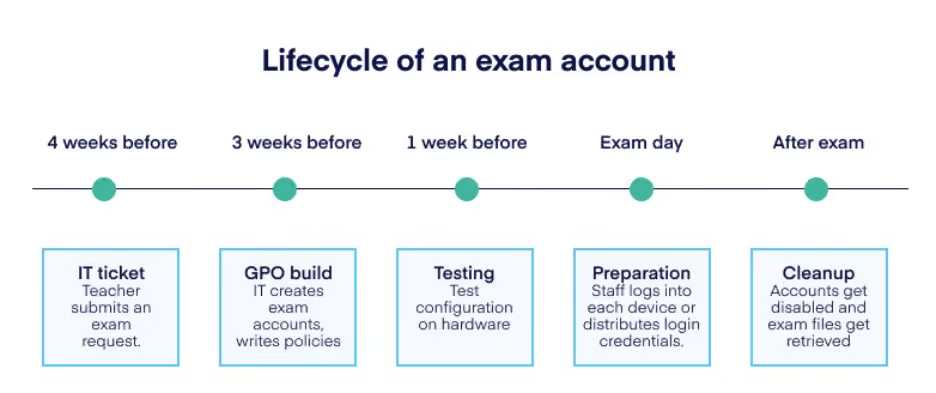
That lead time isn't bureaucratic inefficiency. Building and testing an exam account configuration simply takes time.
After the exam, there's more work: disabling accounts, extracting student data, cleaning up profiles, and resetting passwords if the accounts will be reused.
4. Educators are dependent and have almost no flexibility
Educators are largely dependent on IT to set up digital exams with exam accounts. And because exam account configurations have to be built weeks in advance, they have almost no ability to make last-minute adjustments. If an educator wants to add a reference document to the exam environment the week before the exam, that's a policy change - which means an IT ticket, a waiting period, and a rebuild.
The deeper problem is that exam accounts typically run on a single shared image with one set of policies. Every exam at the institution has to fit into that one configuration. You can't give a law exam access to one set of resources and a business exam access to another without building and maintaining a completely separate image. In practice, most institutions don't. The result is a setup that's both too open for some exams and too restrictive for others - and genuinely secure for none of them.
5. The configuration needs constant maintenance
Blocking specific applications and websites through group policies takes time to set up correctly. But it also has to be actively maintained. Software updates can quietly reopen gateways you thought were closed. Before you know it, a routine Office update adds Copilot to the exam environment you thought was locked down.
The configuration is only as reliable as the last time someone checked it. And with exam accounts, that check often falls on the same small group of people keeping the whole setup running.
The same applies when the exam software itself updates. If your institution runs exams through an assessment platform that pushes an update, the exam account policies may need to be updated to match. Some institutions have found that after a routine update to their exam platform, the exam accounts stopped working entirely until IT manually adjusted the policy configuration.
6. The knowledge often lives with one person
Because exam account setups are built by hand, using tools that weren't designed for this purpose, the knowledge of how everything fits together tends to live with one person. This is usually the IT staff member who built it. They know which policies do what, why certain exceptions were made, and what breaks if you change something. That's fine until they leave. When a new IT colleague takes over, there's often no documentation to speak of, and untangling someone else's GPO configuration is not a straightforward job. Many institutions are one resignation away from not fully understanding their own exam setup.
The same risk applies to the tools IT uses to enforce those policies in the first place. Several universities have recently had to move away from exam accounts not because of the operational problems above, but because the tool they relied on to enforce their group policies, Ivanti Workspace Control, is being deprecated. The policies themselves still existed, but the infrastructure holding them together was discontinued. It's a reminder that exam account setups don't just depend on one person's knowledge - they depend on third-party tooling that was never built for exam use, and that can be changed or discontinued.
How to run secure digital exams without exam accounts
The logic behind exam accounts is sound: students' personal accounts have too much access to use safely in an exam. You need a restricted environment. But exam accounts come with a lot of limitations.
Schoolyear offers device lockdown software that secures exams without using shared accounts. When a student starts an exam, they log in with their own institutional credentials as normal. Schoolyear then launches a secure workspace on top of that session: blocking everything at system level that isn't explicitly permitted: websites, applications, background processes, local files, and cloud storage. The student works in a controlled environment, on their own student account.
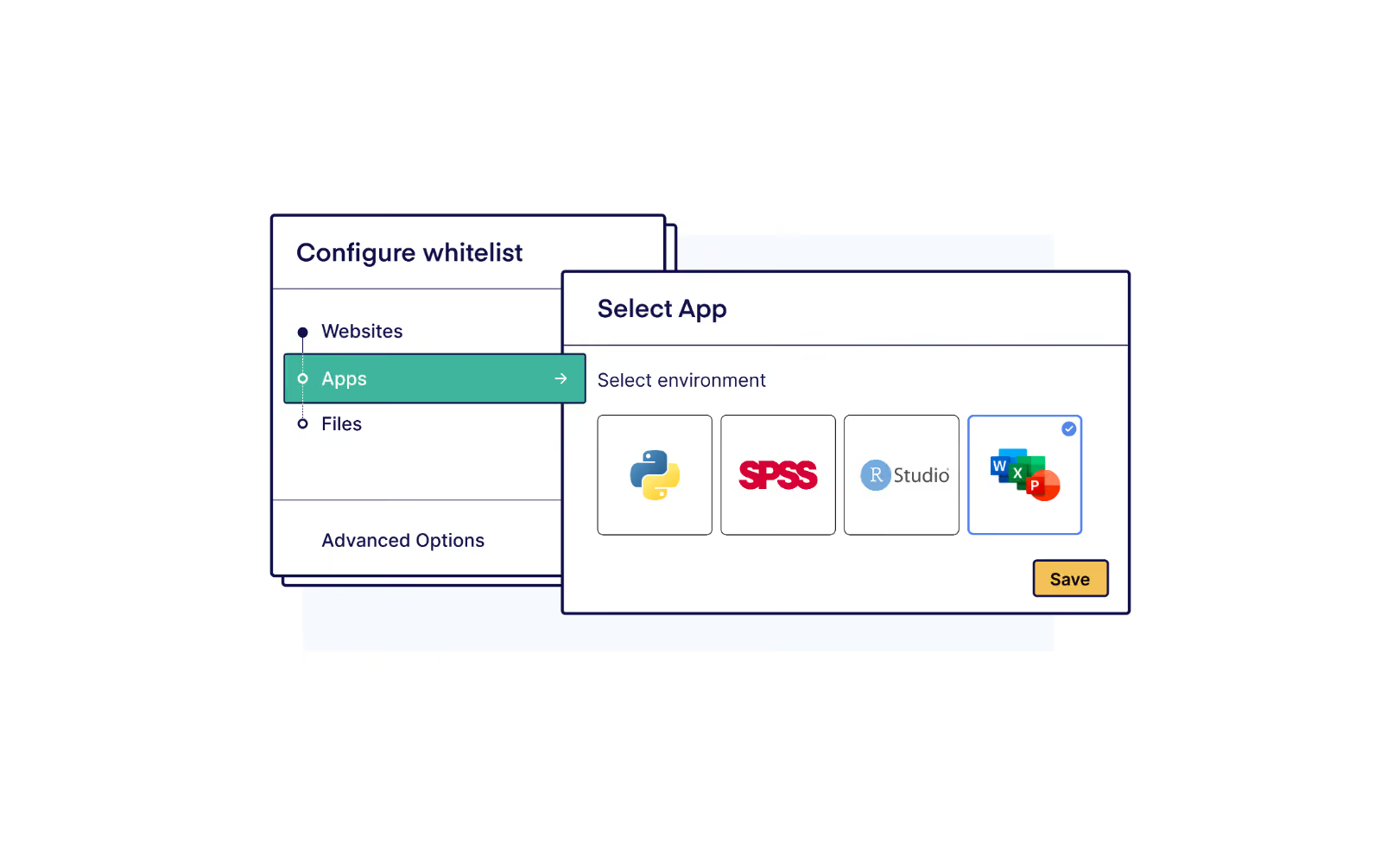
For exams that require desktop applications - Word, Excel, SPSS, or other tools - Schoolyear runs those applications in an isolated environment. The application itself is standardized and clean: no personal files, no cloud storage, no AI add-ins like Copilot. The student's laptop functions as a display terminal. What runs on it is fully controlled.
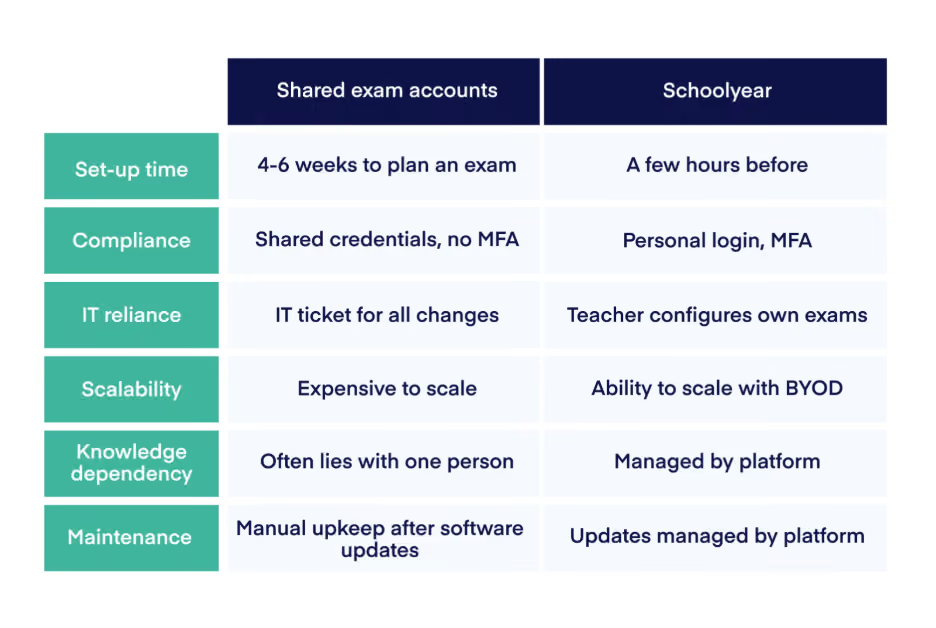
The result is that institutions no longer need a separate account infrastructure, a weeks-long setup process, or dedicated hardware to run secure exams. Here's what that looks like in practice:
Setup time
With exam accounts, IT needs weeks to build, test, and lock in the configuration before an exam can run. With Schoolyear, a teacher or exam coordinator sets up the exam session themselves - defining which applications and websites are accessible and adjusting those settings right up to the day of the exam. No IT ticket. No weeks-long waiting period.
Compliance
Exam accounts require shared credentials with no MFA - a compliance exception that most institutional security policies explicitly prohibit. With Schoolyear, students log in with their own institutional account and MFA applies as normal. There are no shared passwords, no compliance exceptions, and no awkward conversation with your CISO.
IT reliance
Running exams on exam accounts means IT is in the critical path for every single exam. A new website needs whitelisting? IT ticket. A different application needs to be available? IT ticket. With Schoolyear, teachers manage their own exam environments directly. IT sets the platform up once; after that, educators run their own exams without needing IT involvement.
Scalability
Exam accounts only work on managed hardware - which means exam capacity is capped by how many machines IT owns and maintains. Many institutions run entire computer labs that sit empty for most of the year just to cover exam periods. With Schoolyear, exams run on the devices you already have, and extend naturally to student-owned Windows and Mac laptops when your institution is ready to move in that direction.
Knowledge dependency
Exam account setups are typically built and maintained by one person. They know which policies do what, why certain exceptions were made, and what breaks if something changes. When that person leaves, the knowledge goes with them. With Schoolyear, the exam configuration lives in the platform - visible, documented, and accessible to whoever needs it.
Maintenance
With exam accounts, every software update is a potential problem. A new browser version, a changed URL, an application update - any of these can break the configuration, and fixing it means manual policy edits by IT. Schoolyear manages platform updates itself. When something changes, the platform handles it. You don't.
Responsibility
Perhaps the biggest structural problem with exam accounts is who ends up owning them. IT builds and maintains the setup, which means IT becomes responsible for the integrity of every exam - whether the environment was correctly configured, whether the right resources were accessible, or whether cheating was technically possible.
It's understandable how this happened. IT had the tools, IT built the solution, and the responsibility followed. But exam security requires deep domain knowledge: which applications a specific exam needs, what constitutes a cheating risk in a particular subject, how assessment requirements vary across faculties. That's expertise that lives with educators and exam coordinators, not with infrastructure teams. Asking IT to maintain exam integrity at that level of detail is a poor fit for everyone involved - and it rarely produces a setup that's genuinely well-tailored to the exams it's supposed to secure.