.jpg)


Institutions are exploring Safe Exam Browser alternatives due to growing BYOD adoption, the complexity of managing the tool, and the need to test real-world skills in desktop applications like Excel. This guide compares five leading alternatives: Schoolyear – Safe Exam Workspace, Respondus, Proctorio, Honorlock, and Smowl.
When Safe Exam Browser was first introduced, most institutions ran exams only in tightly controlled physical computer labs. Devices were fully managed by the IT department, and students didn’t bring their own laptops. Exam security primarily meant locking down a known, standardized environment.
In that context, this model worked well. IT teams had full control over the devices, the operating system, and the software installed on each machine.
Today, the reality looks very different.
Bring Your Own Device (BYOD) has become common, and assessments increasingly require the use of real-world applications such as Excel, VScode (Python), and RStudio. In a BYOD environment, IT departments no longer control the underlying device, operating system configuration, or installed software.
This means BYOD requires stronger security, since the student effectively has administrative control over the device. It also requires solutions that are not centered around a single IT specialist, but can be managed by educators, as most BYOD exams are organized and operated by education departments.
In this article, we’ll give an honest view of Safe Exam Browser and introduce five strong Safe Exam Browser alternatives for both on-campus and remote exams.
Let’s begin with Safe Exam Browser itself.
What is Safe Exam Browser?
Safe Exam Browser is an open-source lockdown browser originally developed in the mid-2000s. The project started as an initiative within the university’s IT environment to securely run digital exams on managed computers in campus labs.
At the time, this made perfect sense. An IT department controlled every machine. If something needed to be updated, IT handled it.
Safe Exam Browser is highly configurable. It uses downloadable configuration files and institutions can fine-tune a lot of settings. For IT-driven exam environments, this flexibility can be a strength.
Where Safe Exam Browser works well
Safe Exam Browser is not outdated by default. It still performs well in the environment it was built for.
It’s a strong fit for institutions that:
- Run exams primarily in Windows-based computer labs
- Maintain fully managed devices
- Have a dedicated IT team that can be involved in the daily operations of exams
- Treat digital exams as an IT-controlled service
In these settings, Safe Exam Browser’s configurability is a feature, not a burden. IT professionals can tailor settings precisely to their environment.
Where Safe Exam Browser has limitations
The friction begins when the environment changes.
1. BYOD
Safe Exam Browser works as intended on managed devices, where the operating system is locked down and students lack admin rights.
In a BYOD setting, this guarantee disappears. Students are administrators of their own laptops, which means the system itself cannot be fully controlled or hardened by the institution. As a result, students may find a loophole in the security.
This is also the reason why preventive blocking mechanisms alone are not enough. If a student manages to break full screen mode or bypass a restriction, there is no automatic verification layer that flags whether security mechanisms are still functioning correctly.
In managed labs, blocking is often enough. With BYOD, verification becomes far more important.
2. Usability and operational complexity
Safe Exam Browser was built for IT administrators, not necessarily for teachers.
Without the right IT support, teachers must navigate a wide range of configuration options. And if something needs to change quickly, IT often needs to regenerate a completely new configuration file. This is highly inflexible and creates a lot of dependencies on IT, which becomes difficult to scale.

There is also operational complexity on the student side. Safe Exam Browser does not update automatically, which means students must manually install updates on their own devices. In practice, different exams or platforms may require different versions. A configuration file for one exam may only work with a specific version, while another exam requires a different one. This can lead to confusion right before an exam starts.
3. Open source in high-stakes exams
Open-source products have clear benefits. It allows community contributions and transparency to improve the product. Many institutions value that philosophy.
However, in high-stakes exam settings, this also comes with risks. Vulnerabilities in Safe Exam Browser can be identified by both contributors and bad actors looking for ways to cheat the system. Because of this, there are a lot of bypasses circulating online. The fixes to these issues depend on community processes. There is also a security team, however, they don’t offer a service-level agreement. Once patches are finally available, IT teams still need to manually update them to all devices. This entire lifecycle can take a lot of time.
4. Application-based exams
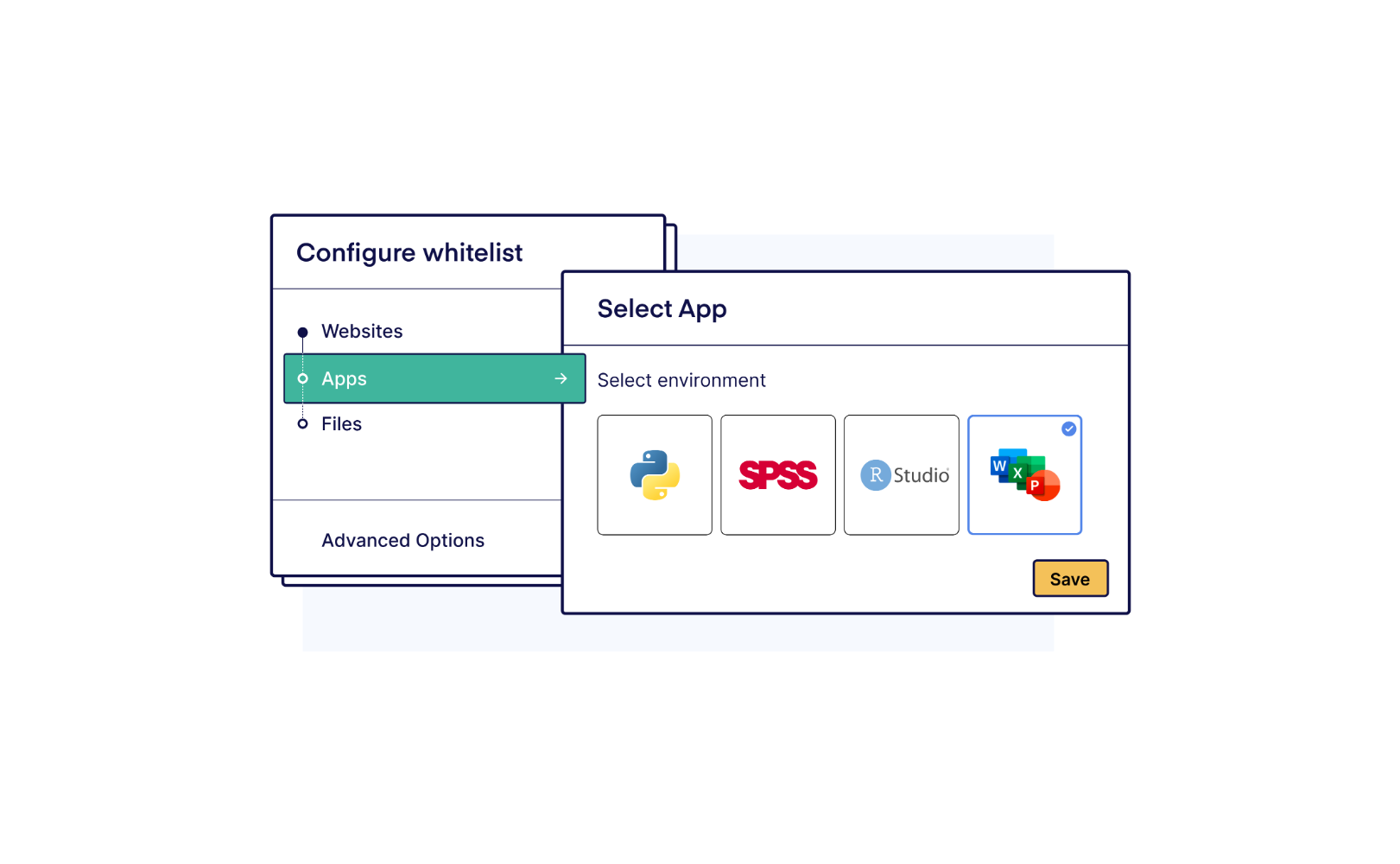
Many educational institutions are moving to more authentic assessments with real-world software, allowing students to use desktop applications such as Word, Excel, SPSS, or R during exams. Safe Exam Browser enables this through local application whitelisting, allowing specific applications to run alongside their locked browser during an exam.
On managed devices, this can work for some applications such as Word, Excel, and SPSS. That's because IT can control the entire system and enforce restrictions that prevent students from accessing the internet. Additionally, IT would have to create dedicated exam accounts. These are isolated user profiles that contain no personal files, ensuring students only have access to what is explicitly permitted for the exam.
The problem arises on student-owned devices, where the student is the administrator. In that environment, institutions simply cannot enforce the same system-level controls.
When applications run locally on a student's own laptop, they interact directly with the operating system, outside the control of the locked browser. This means students can open personal files, access cloud storage like OneDrive, or use AI assistants built into the application, such as Copilot in Excel. Blocking websites in the browser doesn't prevent this, because the applications communicate with the network independently.
Additionally, coding environments pose a particular challenge, even on managed computers. Tools like Visual Studio Code (VS Code) can technically be whitelisted as a local application, but Safe Exam Browser has no control over what happens inside them. Students can still use built-in terminals to access the file system or make network requests and load extensions such as GitHub Copilot. The application is permitted, but its internal functionalities remain completely open.
5. Operational and technical limitations
While Safe Exam Browser itself is free, the process of adopting and using it over time is not without costs. Especially since maintaining it can be a time-consuming task for IT specialists.
Also, knowledge about the tool often sits with a small number of IT specialists. If one leaves, continuity can become a risk. Institutions may discover that maintaining and updating configurations requires more internal effort and costs than expected.
6. Lack of service-level agreement
Exams are a mission-critical process for institutions. Safe Exam Browser is an open-source project distributed without a commercial support model or service-level agreement (SLA). Institutions typically rely on community support if issues occur during exam periods.
What to look for in a Safe Exam Browser alternative
If Safe Exam Browser feels limiting, alternatives should address the gaps created by modern exam requirements.
Key capabilities institutions often look for include:
- BYOD compatibility
- Verification mechanisms (not just blocking)
- Safe support for desktop applications such as Excel
- Easy to operate for educators without IT support
- Fast, centralized, and automatic security updates
- A vendor that prioritizes technical stability
- Professional support and a service-level agreement
It’s important to note that there are two overarching categories within exam security software:
- Solutions for on-campus exams
- Solutions for remote exams
We'll explore Safe Exam Browser alternatives from both categories, starting with the on-campus options.
Alternatives to Safe Exam Browser for in-person exams
1. Schoolyear - Safe Exam Workspace

Safe Exam Browser was created for a time where digital exams were only conducted in managed computer labs with heavy involvement from IT.
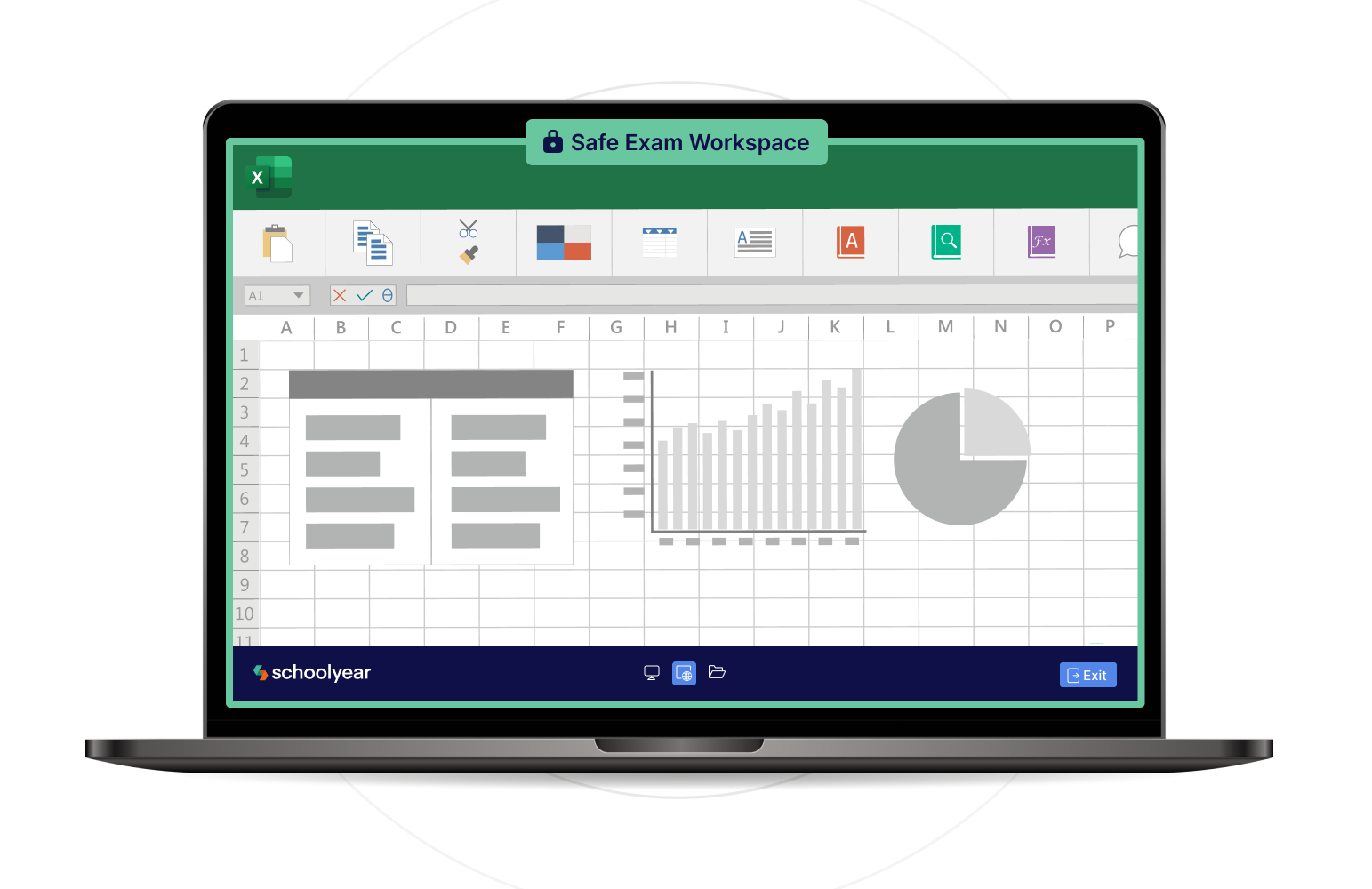
Schoolyear was built for digital exams in the modern age. Whether securing managed lab computers or students' own devices, it handles everything with minimal IT involvement and support for real desktop applications like Excel, SPSS, and VS Code. It's a fundamentally different product for a fundamentally different reality.
How Schoolyear works
When an exam starts in Schoolyear, the device enters a secure and controlled exam mode. Unauthorized applications and common tools to bypass exam security like screen sharing tools, remote desktop software, and virtual machines are blocked. Students only get access to web pages that have been whitelisted and the personal file explorer is fully blocked. But as we established earlier, on a student-owned device, blocking alone isn't enough.
That's why Schoolyear combines this lockdown mechanism with an additional verification layer. In a dashboard, invigilators get alerted in real time if one of the blocking mechanisms has been compromised. With Safe Exam Browser, you simply won't know if a bypass occurs in real time.
Secure use of desktop applications during exams
If you want to assess students in desktop applications like Word, Excel, or R, Safe Exam Browser doesn't offer a secure path for student-owned devices. Schoolyear is currently the only platform that does. It runs applications in an isolated virtual environment, where students can't access personal files, AI assistants, or third-party add-ins.
→ How ROC van Twente runs secure Word and Excel exams on student-owned devices
User-friendliness and support
Implementing and maintaining Schoolyear is straightforward and updates happen automatically in the background, with no manual action required from students. If an educator needs to adjust an exam setup, such as whitelisting an additional file or website, they can easily do it themselves from within their assessment platform or LMS quiz.
Because operating systems change over time, new bypasses to exam security solutions can emerge. Schoolyear is closed source, which makes it significantly harder for students to study how its security mechanisms work. And when a new bypass is discovered, a dedicated security team pushes a fix to all customers immediately. No IT rollout or manual update required from students.
How Schoolyear differs from Safe Exam Browser
- Built for large-scale BYOD exams
- Verification layer that checks if blocking mechanisms still work
- Closed source architecture: no access to code for students
- Ability to securely assess with applications (such as Excel and VS Code)
- An educator-friendly UI to change the settings right in their assessment platform
- Automatic update system: no manual updates by students necessary
- Support for managed Chromebooks
- Proactive support and security teams
Assessment capabilities
Schoolyear supports both:
- Web-based exams
- Desktop applications
Schoolyear integrates with exam and LMS platforms such as Canvas LMS, Moodle, and D2L Brightspace.
Limitations
Schoolyear is designed exclusively for in-person exams and focuses on prevention-based security. It does not include remote proctoring features such as webcam monitoring or behavioral detection, which are typically required for remote exams.
Institutions using Schoolyear generally deliver the majority of their exams in person and use a separate proctoring solution for remote assessments.
2. Respondus
Respondus LockDown Browser is primarily designed for securing low-stakes quizzes inside learning management systems. It’s not a standalone browser, meaning it can only be used inside an LMS quiz module rather than as an independent exam environment.
When students start a quiz, the browser is locked down to prevent actions such as opening new tabs, copying content, or accessing certain websites.
Respondus offers limited support for desktop applications, restricting access to Word and Excel exclusively. However, these permitted applications are not truly isolated. Students can still use features such as add-ins, Copilot, or access their own local files from within them. This makes the setup difficult to secure, particularly on BYOD devices where institutional policies cannot be enforced.
The student launches the LockDown Browser through the LMS they use to access the exam. For remote scenarios, Respondus offers a separate monitoring product (Respondus Monitor), which records students during the exam session. This monitoring is typically reviewed after the exam, where flagged moments are analyzed to identify potential academic misconduct.
Security mainly relies on locking down the browser to prevent students from opening other tabs, websites, or basic system functions. However, the system does not continuously verify whether the security restrictions are still working correctly on the device, which means issues or bypasses may go unnoticed during the exam.
How Respondus differs from Safe Exam Browser
- Closed-source product
- No configuration files required
- Easier deployment for non-technical administrators
- Monitoring available as a separate product (Respondus Monitor)
Assessment capabilities
Respondus supports:
- Web-based exams and quizzes
- Limited desktop application access via local whitelisting
Respondus is commonly used for formative assessments and LMS-integrated quizzes.
Limitations
Respondus LockDown Browser relies on software running directly on the student’s laptop. Today, most online exams take place on student-owned laptops rather than managed campus computers. This means the system depends on devices that the institution does not fully control, making it harder to guarantee that the exam environment is truly secure.
There is no central system controlling the exam environment or the applications students use. If the security restrictions are bypassed by a student, this is not automatically logged or flagged.
Alternatives to Safe Exam Browser for remote exams
3. Proctorio
Proctorio approaches exam security through a combination of locking down the student’s personal browser and monitoring. Their main focus is securing remote exams.
It operates as a browser extension, with additional security features available through companion components. When integrated with an LMS, students install the extension before starting the exam. The system can enforce full-screen mode, block navigation, and restrict certain browser functions.
Cheating prevention is therefore enforced within the browser session through preventive controls. However, applications and processes running outside the browser are not structurally isolated, creating opportunities for students to exploit weaknesses beyond the browser’s control. That’s why most institutions using Proctorio rely mostly on its monitoring capabilities.
The monitoring capabilities include recording webcam, microphone, and screen activity. AI-based flagging is used to detect potentially suspicious behavior. After the exam, instructors have to manually check all footage that was flagged and determine the consequences.
How Proctorio differs from Safe Exam Browser
- Designed primarily for remote exam delivery
- Delivered through a browser extension rather than a standalone locked down browser
- Combines basic browser-level restrictions with monitoring
- Uses automated flagging to detect suspicious behavior
Unlike Safe Exam Browser, Proctorio's focus is more on monitoring than prevention. Its controls are largely scoped to the browser session, meaning applications outside the browser are not structurally contained. As a result, tools running elsewhere on the device (such as messaging apps, remote access tools, or AI software) are harder to fully control during the exam.
Security incidents are addressed through recorded evidence and flag review rather than infrastructure-level prevention and detection.
Assessment capabilities
Proctorio supports:
- Web-based exams
- Remote exam delivery with monitoring
It is primarily used by institutions for remote testing environments where oversight and recording are required.
Limitations
Proctorio's browser extension only operates within the browser and can't structurally prevent all device-level activity. Background applications, remote tools, or virtualization environments may exist outside the extension’s full control. This means that students may still be able to access the internet and AI tools while Proctorio runs.
Additionally, large-scale video review requires significant manual effort. Automated flagging systems often generate a high number of alerts, many of which still need to be manually reviewed. At scale, this can translate into hours of additional work per exam session.
The use of webcam recording, screen recording, and audio monitoring can also raise privacy concerns. Students may object to being recorded, and institutions must consider data storage, consent, GDPR compliance, and how long recordings are retained.
4. Honorlock
Honorlock is a remote proctoring solution primarily designed for off-campus exams. While Proctorio relies on fully automated AI-based monitoring, Honorlock uses a hybrid approach that combines AI flagging with the ability for live proctors to intervene in real time when suspicious behavior is detected.
Like Proctorio, Honorlock requires students to install a browser extension that enables a set of lightweight blocking mechanisms.
Honorlock’s browser extension can restrict navigation away from the exam, disable certain browser functions, and limit access to unauthorized websites. However, these restrictions apply only within the browser itself. Applications can still run locally, and the exam environment is not isolated at the operating system level.
In some configurations, an additional desktop component can provide extended controls beyond the browser environment. As with many browser-centered approaches, institutions should evaluate how effectively these controls handle newly emerging tools and bypass techniques.
Institutions relying on Honorlock are therefore effectively depending on its monitoring capabilities rather than its lockdown abilities. On that front, Honorlock records webcam, microphone, and screen activity, and uses AI to flag suspicious behavior, which can then be escalated to live proctors for further review.
How Honorlock differs from Safe Exam Browser
- Adds lightweight blocking mechanism to the student’s personal browser, rather than operating as a standalone locked down browser
- Delivered primarily through a Chrome extension (and in some cases an additional desktop component)
- Strong emphasis on remote proctoring and live supervision
- Uses webcam, screen, and AI-based behavioral monitoring alongside preventive browser controls
- Designed mainly for remote exam scenarios rather than controlled on-campus environments
Unlike Safe Exam Browser's device lockdown model, Honorlock does not aim to create a sealed local environment. Instead, it observes activity and flags anything it considers suspicious. Security decisions are often made after reviewing flagged sessions rather than being structurally prevented at system level.
Assessment capabilities
Honorlock supports:
- Web-based remote exams
- Proctored online assessments
It’s most commonly used in fully remote testing environments.
Limitations
Because enforcement relies on monitoring rather than structural prevention, device-level control is limited. If you're looking to assess applications such as Excel or VS Code, you will rely totally on behavioral detection and manual review to ensure there has been no cheating.
As with Proctorio, institutions should also take privacy considerations into account.
5. Smowl

Smowl is, just like Proctorio and Honorlock, a proctoring solution focused on remote exam supervision. Where Proctorio relies heavily on automated monitoring and Honorlock combines AI with live proctors, Smowl takes a slightly different approach by emphasizing identity verification and evidence-based monitoring.
When integrated with an LMS, Smowl operates primarily within the browser, sometimes supported by an additional desktop component (SMOWL CM) for extended device monitoring.
When the desktop component is installed, Smowl can monitor active applications, browser tabs, connected devices, and clipboard activity. However, unlike a true lockdown environment, SMOWL CM does not actively block unauthorized applications. Instead, it logs them for post-exam review by the institution. Actual prevention remains limited to the browser layer.
Instead of continuously recording video, Smowl captures periodic snapshots of the student’s face, screen, and environment during the exam. These images are taken at regular intervals and analyzed using AI to detect irregularities such as absence from the screen, presence of other people, or unusual behavior.
All collected data is compiled into a report with flagged incidents, which is to be reviewed after the exam.
Like other proctoring tools, the exam environment is not structurally isolated at the operating system or infrastructure level. Applications can still run locally on the student’s device, and enforcement relies on detecting suspicious behavior rather than preventing it outright.
How Smowl differs from Safe Exam Browser
- Monitoring-first approach rather than pure preventive lockdown
- Strong focus on identity verification and remote supervision
- Offers lightweight blocking mechanisms in the student’s personal browser
- Relies on behavioral analysis and recorded evidence instead of device isolation
Unlike Safe Exam Browser, Smowl does not attempt to block the full device environment. Instead, it monitors user behavior within the exam session. Security concerns are typically addressed through post-exam review rather than infrastructure-based prevention.
Assessment capabilities
Smowl supports:
- Web-based remote exams
- Identity verification workflows
It is primarily used in remote proctored assessment scenarios.
Limitations
As with other monitoring tools such as Proctorio and Honorlock, institutions should decide whether watching recordings of 'suspect movements' from all students in large-scale exams is scalable. Also, they should consider the privacy aspects of filming their students while taking exams.
How to pick a Safe Exam Browser alternative that fits your institution best
Safe Exam Browser remains a strong solution in the environment it was built for: managed computer labs with centralized IT control.
The real challenge isn’t that Safe Exam Browser changed, it’s that the environment did. Institutions are looking for exam security solutions that support BYOD, require little IT involvement, and can securely enable assessments with desktop applications.
When selecting an alternative, the key question is not which tool is “best”, but which model fits your reality. Consider:
- How much control do you have over the student’s device (managed lab vs BYOD)?
- Do you rely on prevention, or are you willing to depend on monitoring and post-exam review?
- Are your exams high-stakes, where undetected breaches are unacceptable?
- Do you need to assess real applications like Excel, VS Code, or SPSS?
- Are your exams conducted on-campus, remotely, or both?
- How important is student privacy in your assessment approach?
- How much time does your IT department have to be involved?
Each of these factors directly determines which type of solution is viable. There is no universally “best” solution.
But there is a solution that fits how your exams are set up, what you want to assess, and how strict you need the security to be.
Conclusion
The tools in this guide were all built to solve real problems. The question is whether they were built to solve your problem.
For institutions still running exams in managed computer labs with IT oversight, Safe Exam Browser remains a legitimate choice. For institutions moving toward BYOD, application-based assessments, or high-stakes exams without dedicated IT support, the gap between what Safe Exam Browser was designed for and what you actually need has grown too wide to ignore.
The proctoring tools (Proctorio, Honorlock, and Smowl) shift the model from prevention to observation. Their main focus is on monitoring the behavior of the student, not preventing it.
Schoolyear takes a different position. Where Safe Exam Browser locks down the device but can't verify the lockdown is still working (especially on student-owned devices), Schoolyear combines that same preventive layer with real-time verification that confirms security is intact throughout the exam. It's the only option on this list that can also run desktop applications like Excel or VS Code in a secure, isolated environment on BYOD devices. For institutions that want that level of security without surveillance, it's the most future-ready option on this list. Interested to see how it works for yourself? Request a 14-day Schoolyear trial.